Annotated interface guide
3 calloutsKeyword Research
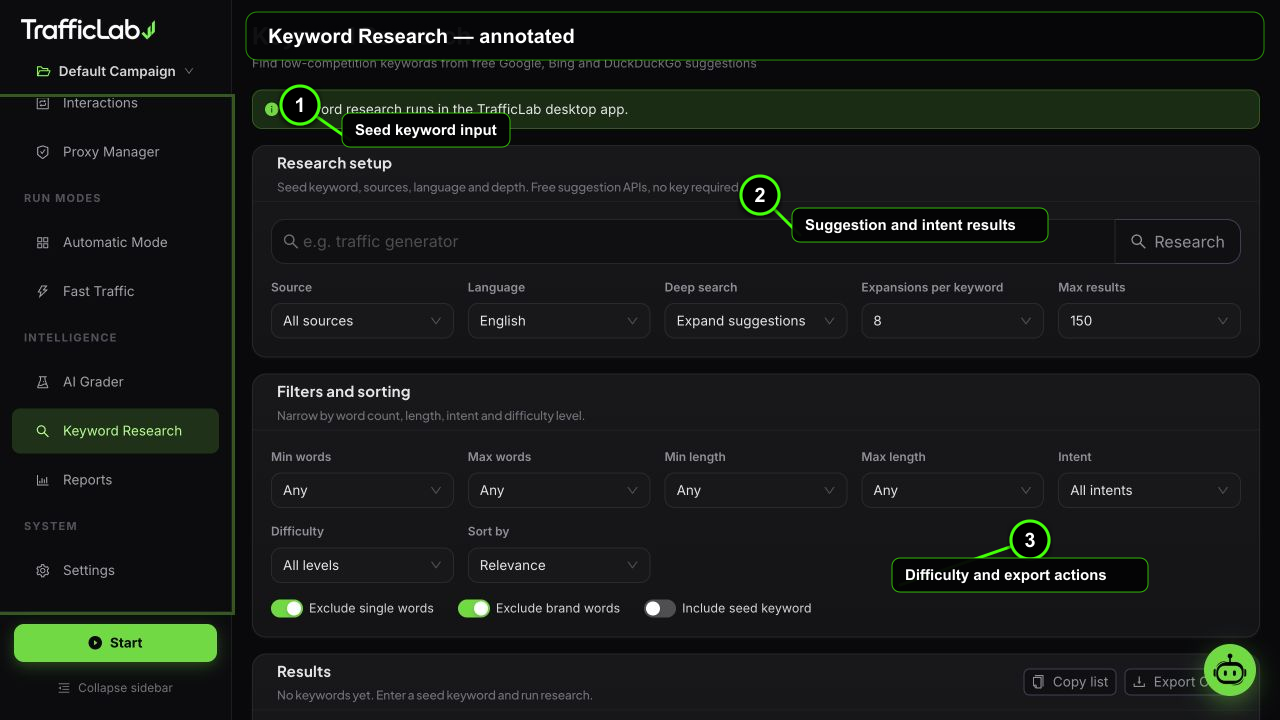
- 1Seed keyword input
- 2Suggestion and intent results
- 3Difficulty and export actions
Keyword Research suggests real keywords from Google, Bing and DuckDuckGo suggestions, then classifies each one by intent and difficulty so you can pick the best targets for your campaign.
Free and real
The suggestions come from live search engine suggestion endpoints, not from a local dictionary. Every keyword is something people actually type.
Research setup
Type a seed keyword and press Research (or Enter). Before you start, tune:
| Option | Default | Values | Description |
|---|---|---|---|
| Source | All | Google, Bing, DuckDuckGo, All | Which search engines to pull suggestions from. All merges the three. |
| Language | English | 13 languages | English, Spanish, German, French, Portuguese, Russian, Italian, Chinese, Japanese, Korean, Arabic, Hindi, Turkish. |
| Deep search | 1 | Off, 1, 2 | Searches one or two levels deeper into the suggestion graph for longer-tail keywords. |
| Expansions | 8 | 5, 8, 10, 15 | How many related suggestions to expand per seed. |
| Max results | 150 | 50 to 500 | Ceiling on returned rows. |
Filters
Shape the result setAll filters apply instantly to the result table
- Word count: minimum and maximum words per keyword.
- Length: minimum and maximum characters.
- Intent: informational, commercial, transactional, navigational or local.
- Difficulty: very easy (0 to 29), easy (30 to 49), medium (50 to 69), hard (70 to 84), very hard (85 to 100).
- Sort: relevance, difficulty, words, length or alphabetical.
- Toggles: exclude single words, exclude brand-like terms, include the seed itself.
Understanding the results
Each row shows the keyword, word count, character count, intent tag, difficulty bar and label, related count and source tag.
| Keyword | Intent | Difficulty | Source |
|---|---|---|---|
| best seo tools 2025 | Commercial | ||
| how to get more traffic | Informational | bing | |
| seo audit service | Transactional | duckduckgo |
Example rows. Difficulty is estimated from keyword structure and related-term volume signals; use it as a relative guide.
Intent types
Informational
People want to learn: "how to get more traffic". Great for content and organic sessions.
Commercial
People compare options: "best seo tools". Good for landing pages and reviews.
Transactional
People want to act: "seo audit service". Strong buying signals.
Navigational
People look for a specific site or brand: "trafficlab app".
Local
People search near a place: "seo agency in berlin".
Using keywords in campaigns
- Run the research with your seed.
- Filter to the intent you target and to a comfortable difficulty band.
- Press Copy to put the filtered list on the clipboard, or Export CSV to download it.
- Paste the keywords into Engine Setup (Organic engine section) so sessions type them into the search engine.
Desktop only
The suggestion engine runs in the Electron main process. The browser preview shows a notice and disables research.
Pair difficulty with grader feedback
Very hard keywords attract heavy competition; very easy ones may look trivial in analytics. The medium band (50 to 69) is usually the sweet spot for realistic test traffic.
Related
- Engine Setup: where keywords become typed searches.
- Campaigns: keyword counts appear on campaign cards.