Annotated interface guide
3 calloutsTechnical requirements
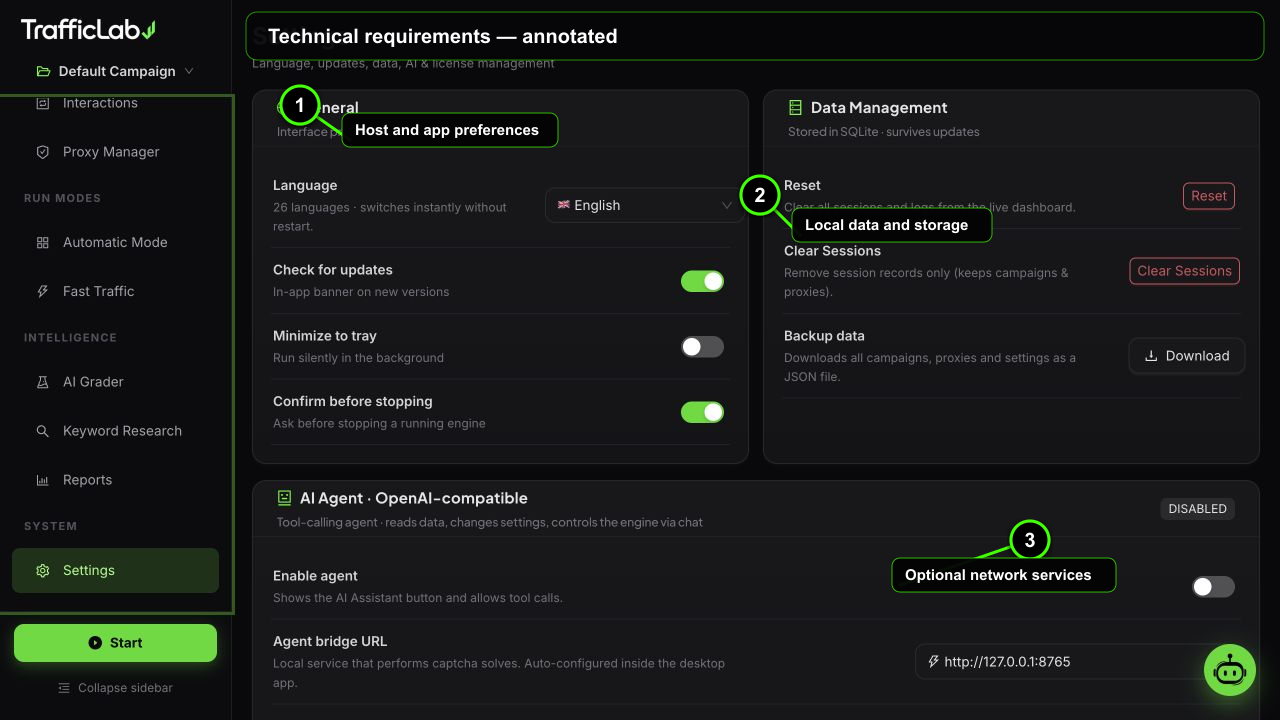
- 1Host and app preferences
- 2Local data and storage
- 3Optional network services
TrafficLab is an Electron desktop application. These requirements describe the supported host environment for the packaged client and the optional services it can connect to.
Technical requirements
Supported hostInstall these before the first run
| Option | Default | Values | Description |
|---|---|---|---|
| Operating system | Windows 10 1809+ | Windows 10 1809+ or Windows 11, 64-bit | The CodeCanyon package is a Windows x64 desktop application. |
| RAM | 4 GB minimum | 8 GB recommended; 16 GB for larger parallel runs | Each active browser worker consumes additional memory. Start with fewer workers on smaller machines. |
| CPU | 64-bit dual-core | Modern 4-core CPU recommended | More cores allow more simultaneous browser sessions without UI or session-log delays. |
| Storage | 1 GB free | Additional cache and report space | The private Chromium runtime, browser cache, screenshots and exported reports use additional disk space. |
| Network | Internet during setup | Required for activation and optional providers | The installer downloads the private Chromium runtime; AI, GA4, proxy and captcha integrations use their own endpoints. |
| .NET | None | No .NET Framework or .NET Desktop Runtime | The core client runs on Electron/Chromium and does not require a separate .NET dependency. |
Optional integrations
- AI Agent: an OpenAI-compatible endpoint, model name and API key.
- GA4: a Measurement ID and Measurement Protocol API secret.
- Captcha providers: a provider account and API key; service charges are separate.
- Proxy routing: working HTTP or SOCKS endpoints if geographic testing is required.
Browser preview versus desktop app
npm run dev provides the full UI and simulation mode in a normal browser. Real Chromium sessions and the private browser runtime are available in the Electron desktop build.