Annotated interface guide
3 calloutsHumanizer Engine
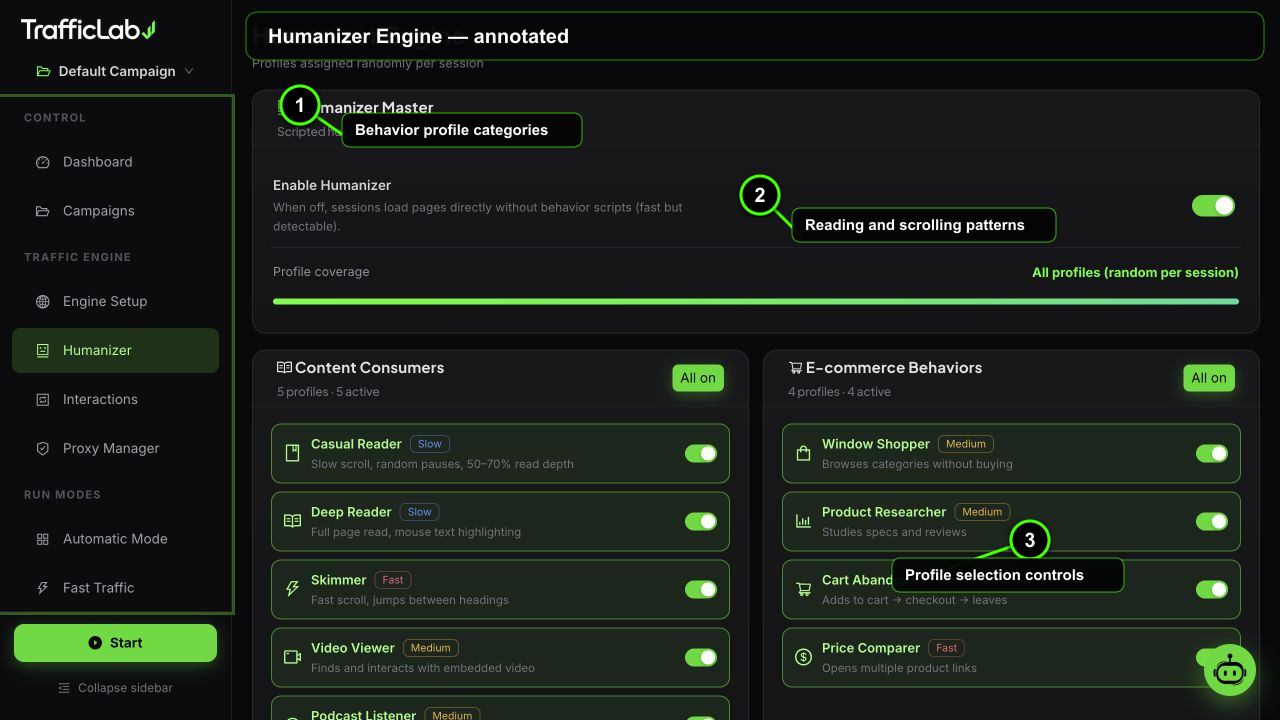
- 1Behavior profile categories
- 2Reading and scrolling patterns
- 3Profile selection controls
The Humanizer Engine assigns a behavior profile to every session, so each visit scrolls, pauses, hovers and clicks like a different kind of person.
How it works
Master switch and coverageThe page header shows the profile pool state
- Master switch: turns humanizer profiles on or off for the active campaign. When off, sessions use the base engine behavior.
- Coverage bar: shows how many profiles are in the pool out of the total (19). An empty selection means all 19 profiles are active.
- Assignment: each session randomly picks one profile from the active pool at creation time. The chosen profile is stored on the session and shown in reports.
Selecting profiles
- Empty selection: all profiles are in the pool (the default, and the most varied).
- Click a profile to make the pool just that one, then click more to add them. The first explicit choice narrows the pool.
- Click a selected profile again to remove it. Click the category button to toggle all profiles of a category at once.
- The coverage bar updates live so you always know how many profiles are active.
All 19 profiles
Profiles are grouped into six categories. The speed tag (slow, medium, fast) tells you how quickly the profile moves through a page.
| Profile | Category | Speed | What it does |
|---|---|---|---|
| Casual Reader | Content Consumers | slow | Slow scroll, random pauses, 50 to 70 percent read depth. |
| Deep Reader | Content Consumers | slow | Full page read with mouse text highlighting. |
| Skimmer | Content Consumers | fast | Fast scroll, jumps between headings. |
| Video Viewer | Content Consumers | medium | Finds and interacts with embedded video. |
| Podcast Listener | Content Consumers | medium | Looks for and interacts with audio players. |
| Window Shopper | E-commerce | medium | Browses categories without buying. |
| Product Researcher | E-commerce | medium | Studies specs and reviews. |
| Cart Abandoner | E-commerce | fast | Adds to cart, goes to checkout, then leaves. |
| Price Comparer | E-commerce | fast | Opens multiple product links. |
| Comment Reader | Social Users | medium | Scrolls deep to the comments section. |
| Liker | Social Users | fast | Hovers over reaction buttons. |
| Sharer | Social Users | fast | Interacts with share widgets. |
| Job Seeker | Professional | medium | Applies filters, reads list items. |
| Form Filler | Professional | medium | Interacts with non-critical input fields. |
| Document Downloader | Professional | fast | Finds PDF and download links. |
| Tab Explorer | Power Users | fast | Opens multiple internal links. |
| Keyboard Navigator | Power Users | fast | Uses keyboard shortcuts for navigation. |
| Touch Scroller | Mobile-Native | medium | Swipe gestures on mobile viewports. |
| App-Like Navigator | Mobile-Native | fast | Mimics single-page-app browsing patterns. |
Category icons in the app
Content Consumers
Readers, viewers and listeners who consume the page deeply or quickly.
E-commerce Behaviors
Shoppers, researchers and abandoners who interact with stores and products.
Social Users
People drawn to comments, reactions and share buttons.
Professional Users
Job seekers, form fillers and document downloaders.
Power Users
Tab explorers and keyboard navigators who move fast.
Mobile-Native
Touch and app-like behavior on mobile viewports.
More profiles, more variety
Keep all 19 profiles active for maximum diversity. Narrow the pool when you test a specific behavior (for example only Cart Abandoner while testing checkout recovery).
Profiles are per campaign
Humanizer settings belong to the active campaign. Duplicate a campaign to create variants with different profile pools.
Related
- Engine Setup: the identity mix (device, OS, browser) that profiles act on.
- Interaction Engine: the actions profiles can trigger.