Annotated interface guide
3 calloutsFast Traffic
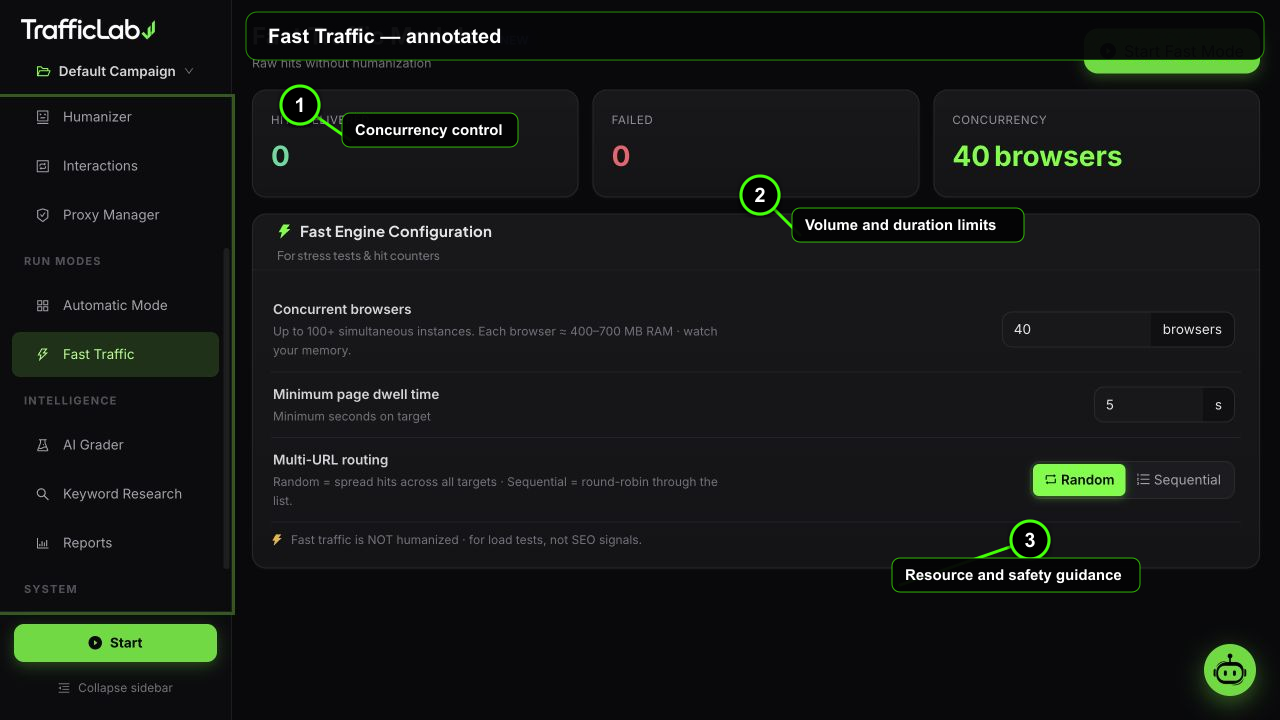
- 1Concurrency control
- 2Volume and duration limits
- 3Resource and safety guidance
Fast Traffic is the volume module: raw hits without humanization, for high-pressure tests where you want maximum sessions in minimum time.
What it does
- Launches many concurrent real browsers (or simulated sessions in preview) and points them at your URLs.
- Skips the humanization layers: no reading profiles, no comment forms, no warmup.
- Each browser lands, waits its dwell time, and moves to the next URL in the list.
Not for realism tests
Fast Traffic sessions look like exactly what they are: fast, shallow visits. Use it for load testing, stress tests and volume checks. Use the normal engine for realistic analytics.
Live stats
Hits
1,204
Failed
18
Concurrency
40
- Hits: completed visits.
- Failed: sessions that could not complete.
- Concurrency: the configured number of simultaneous browsers.
Settings
| Option | Default | Values | Description |
|---|---|---|---|
| Concurrency | 40 | 5 to 150 | Number of simultaneous browsers. Higher is faster and heavier on CPU, RAM and the target site. |
| Dwell time | 5s | 1 to 60s | How long each browser stays on a URL before moving on. |
| Routing | Random | Random, Sequential | Random shuffles the URL list per visit; sequential walks the list in order. |
Controls
- Start: begins a fast run with the active campaign's URLs.
- Stop: ends the run. A warning alert is shown while the run is active.
- Configuration locks while running.
Watch the target
At 150 concurrent browsers, your target site gets a real load spike. Start at 40 and check the target's response time before raising the concurrency.
When to use Fast Traffic
Good fits: load testing before launch, CDN and cache warm-up, uptime checks, and volume validation of analytics pipelines. Bad fits: behavioral analytics, engagement metrics and any test that needs human-like signals.
Related
- Automatic Mode: the continuous, validated alternative.
- Engine Setup: the campaign URLs Fast Traffic uses.