Annotated interface guide
3 calloutsInteraction Engine
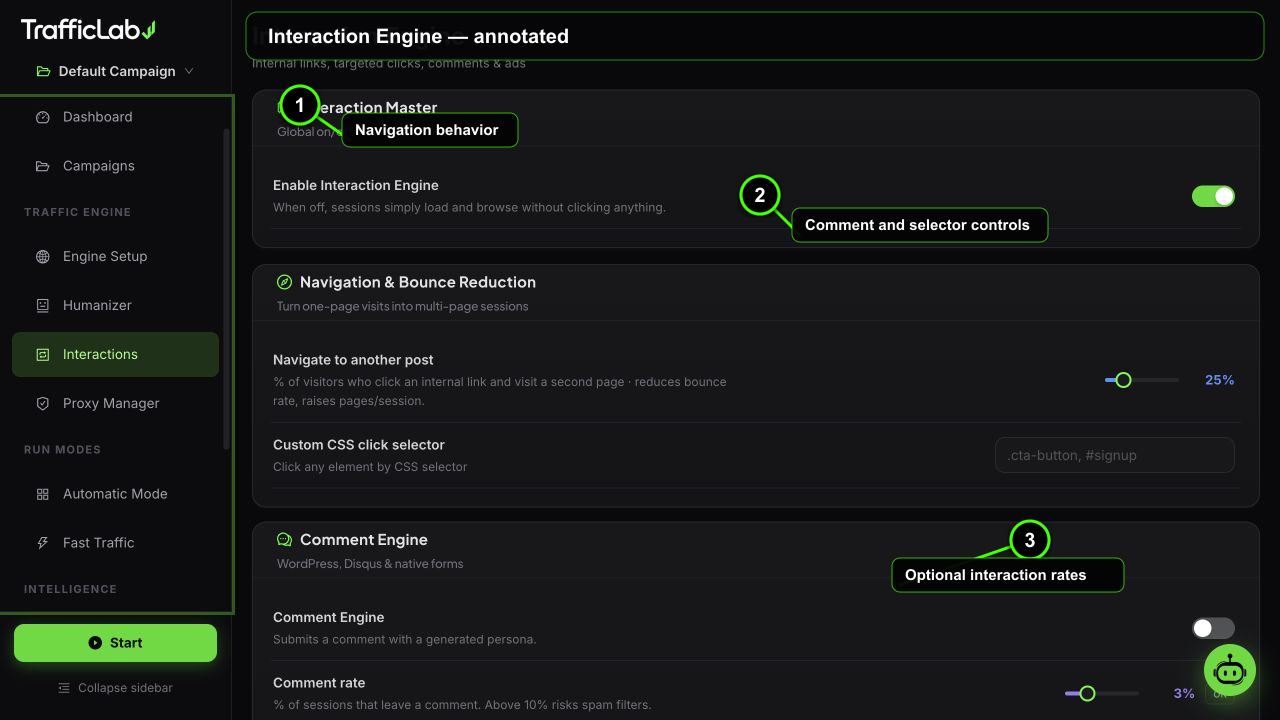
- 1Navigation behavior
- 2Comment and selector controls
- 3Optional interaction rates
The Interaction Engine decides what browsers do on your page after they arrive: follow internal links, click specific elements, submit comments, and occasionally click ads.
Scope
All settings belong to the active campaign and are locked while the engine runs. The master switch gates the whole page; when it is off, the rest of the settings are dimmed.
Navigation
Internal links and targeted clicksDeepen sessions beyond the landing page
- Internal link clicks: percent of sessions that click a same-origin link found on the page (0 to 100). The browser picks a real link from the page, nothing fabricated.
- CSS selector: an optional selector (for example
#pricingor.cta-button) for targeted clicks. When set, sessions may click matching elements instead of random links. - Test selector: type a selector in the test box and press the button. The app checks the format and gives instant feedback.
Comments
Real comment form submissionsRate, source, persona and tone
- Comment rate: percent of sessions that submit a comment, 0 to 10. Rates above 10 are flagged as too aggressive.
- Source: Local templates (works offline), AI generated (needs the AI Agent configured) or Mixed.
- Persona: Auto (generated name), Full (real-looking name) or Username (handle style).
- Tone: casual, professional, enthusiastic or neutral.
- Length: short, medium or long.
- AI config: the section shows the configured model and its readiness, with a shortcut to Settings when the AI Agent is not set up.
- Test comment: generate a sample comment right from the page to preview what will be written.
The engine finds the comment form on the page and submits it like a person: typing the text, filling the name, pausing, then pressing submit. Best effort: if the page has no comment form, the session just continues.
Ad clicks
Best-effort ad clicks with a risk meterConfigure carefully, the grader watches this
| Option | Default | Values | Description |
|---|---|---|---|
| Ad clicks | Off | On, Off | Allow sessions to click ads they find on the page. |
| Click probability | 1% | 0 to 5, step 0.5 | Chance per session. The UI shows the CTR progress bar and a risk label. |
| Dwell time | 30s to 90s | Min 10 to 45s, Max 30 to 120s | How long the browser stays on the ad landing page after clicking. |
Risk labels guide you:
Safe at 0%Low risk up to 1%Caution up to 2%Danger above 2%
Keep it below the safety ceiling
The AI Grader flags any campaign whose ad click probability exceeds 2 percent as an instant ad-fraud signal. Stay at 1 percent or below for realistic, defensible behavior.
How the engine picks actions
- The session finishes browsing the page.
- If interactions are enabled, internal link clicks are rolled first (per the percent slider).
- When a CSS selector is set, sessions may use it for the click instead of a random link.
- Comments roll their chance; when it hits, the source mode decides local or AI text.
- Ad clicks roll last with their probability and dwell time.
AI comments example
With AI mode, the agent generates text like this (tone neutral, medium length):
text
"Thanks for the detailed write-up. The section on session
distribution answered a question I had about mixing sources.
I will try the balanced preset on my next test run."
Comments work best on blogs
Comment submissions need a real comment form. Blog posts, news articles and community pages work well; landing pages usually have none, and sessions simply skip the step.
Related
- Humanizer Engine: the profiles that decide how actions feel.
- AI Grader: checks your interaction settings for risk.