AI Campaign Grader
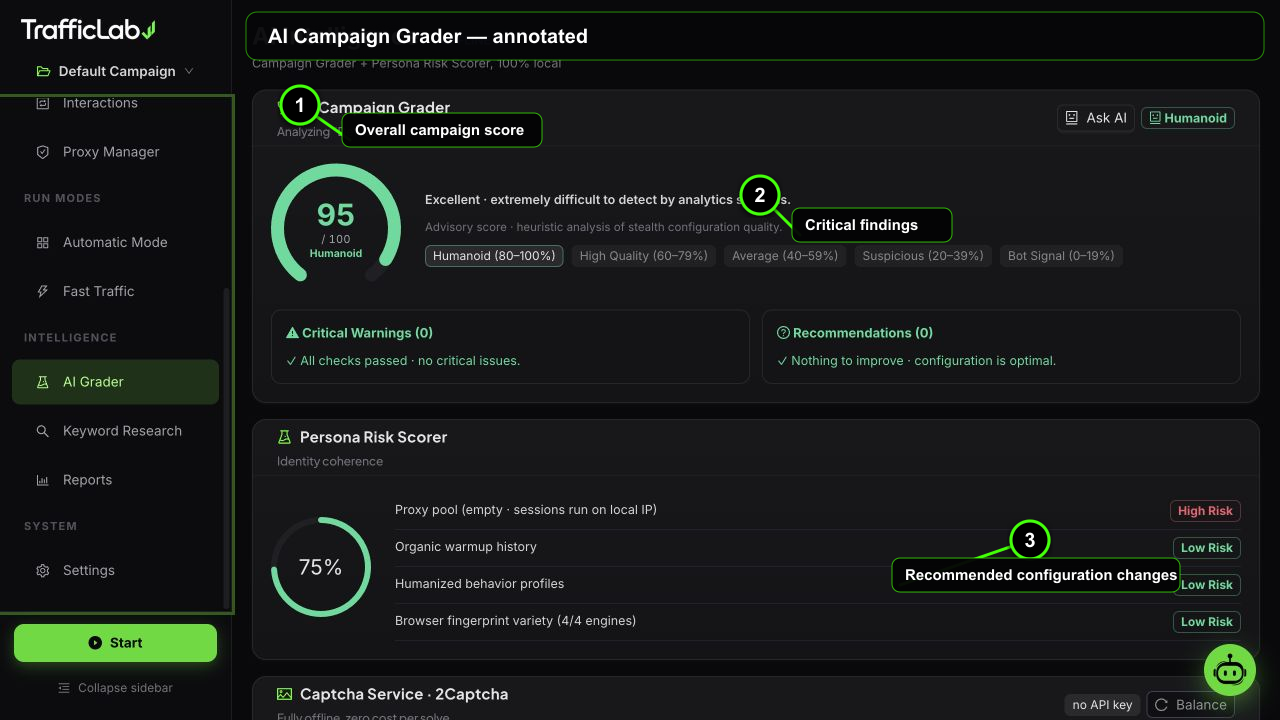
- 1Overall campaign score
- 2Critical findings
- 3Recommended configuration changes
The AI Grader scores your active campaign from 0 to 100, explains the weak spots, and rates how risky your persona looks. It runs 100% locally, no API key needed.
Campaign grade
The grader analyzes the full campaign configuration: distribution, identity mix, proxy setup, humanizer profiles, interaction settings and comment rates. It produces a score and one of five bands:
90 to 100. The configuration looks like real, varied people. Keep it.
Strong setup with small room for improvement.
Workable, but several signals could be more natural.
Patterns that analytics systems often flag.
Strong automation-risk signals. Fix the critical findings before running.
Findings panel
- Critical: must fix. Example: ad click probability above 2 percent, or sessions planned without any proxy while using one is expected.
- Recommendations: should improve. Example: narrow identity mix, or social distribution without configured referrers.
- Warnings: situational notes. Example: empty keyword list or 100 percent single browser share.
Example critical finding from the grader logic: "Ad click probability exceeds the 2 percent safety ceiling, an instant ad-fraud flag."
Persona Risk Scorer
The persona scorer checks that the identity story holds together:
- Proxy pool: empty pool while proxies are expected scores high risk; a populated pool scores low.
- Device mix: single-device or mismatched device and browser mixes raise risk.
- OS and browser coherence: for example iOS sessions without Safari, or macOS without Safari.
- Distribution sanity: extreme source splits and zero-weight categories are flagged.
- Comment and ad behavior: high rates or high probabilities raise risk.
The overall score is a circle gauge: green above 70, gold between 40 and 70, red below 40.
Ask AI for improvements
The Ask AI button on the grader card sends your campaign configuration and the grader output to the AI agent, which replies with the top three improvements. This needs the AI Agent configured in Settings.
Captcha status at a glance
The page also shows the Captcha Service status: configured key and provider, balance, and a self-test button that solves a real demo captcha. Full details live on the Captcha Service page.
Related
- Engine Setup: the settings the grader reviews.
- Interaction Engine: ad click and comment settings.