Annotated interface guide
3 calloutsSettings
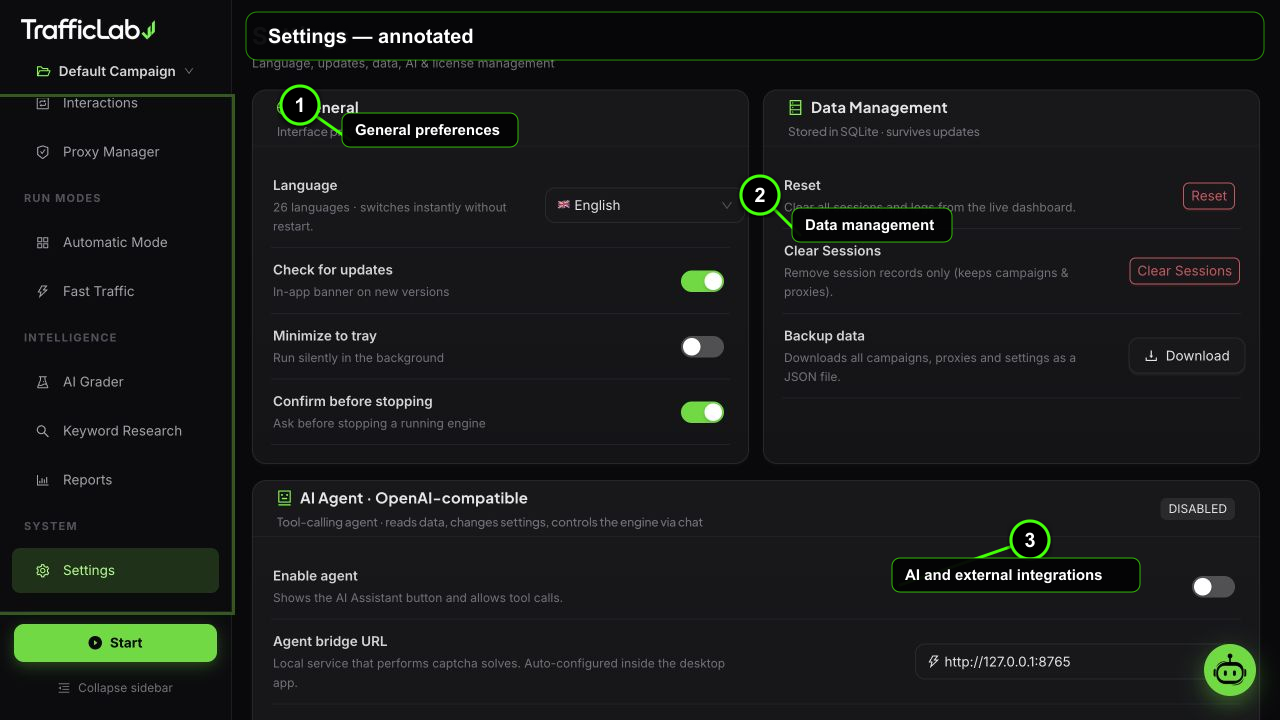
- 1General preferences
- 2Data management
- 3AI and external integrations
Settings holds the app-wide configuration: language, data management, the AI Agent, the Captcha Service, GA4 tracking, licensing and version information.
Branding and workspace customization
Customize the visual identitySource build and packaged app
The application uses a small set of replaceable brand assets. Keep the same filenames so the Electron shell, browser preview, documentation and installer continue to resolve them.
| Option | Default | Values | Description |
|---|---|---|---|
| Long logo | logo-traffic.webp | 800×142 px, transparent | Shown in the app sidebar, splash screen and docs header. Keep the accent close to the wordmark. |
| Square icon | favicon.png / icon.png | 128×128 web; 1024×1024 desktop | Used by the browser tab, desktop shortcut and installer. Use a simple, high-contrast circular browser mark at small sizes. |
| Accent color | #44FF08 | CSS theme token | Controls buttons, active navigation, progress bars and highlight borders. Update the matching theme token if you change it. |
| Workspace data | Local storage | backup.json export | Campaigns, settings and reports stay on the user machine; use Backup before changing configuration. |
After changing assets, rebuild the app and docs, then verify the sidebar, splash screen, favicon and installer icon at both full size and 64px. Do not put product suffixes or extra words inside the square icon.
General
Language, updates, trayApp behavior
- Language: 20 languages including English, Spanish, German, French, Portuguese, Russian, Italian, Chinese, Hindi, Arabic, Japanese, Korean, Turkish, Dutch, Polish, Vietnamese, Thai, Indonesian, Urdu and Bengali. The interface switches instantly.
- Check updates: lets the app check for new versions.
- Minimize to tray: closing the window keeps the app in the system tray instead of quitting.
- Confirm stop: asks for confirmation before stopping the engine.
Data
Reset, clear, backupEverything is stored locally
- Reset: clears all stats (counters on the dashboard).
- Clear sessions: removes all session records and the log.
- Backup: downloads a JSON file with your campaigns, proxies, settings, AI config and both run-mode configs. Keep it safe and restore by importing nothing special: the file is your archive.
AI Agent
OpenAI-compatible assistantFull reference on the AI Agent page
- Bridge URL: local agent bridge, default
http://127.0.0.1:8765, with a live health check button. - Base URL: any OpenAI-compatible endpoint.
- API key: stored locally.
- Model: loaded from the endpoint or typed manually.
- Test connection: reports latency in ms.
See AI Agent Chat for the full guide.
Captcha Service
2Captcha, rucaptcha, CapMonsterFull reference on the Captcha Service page
- Provider: 2captcha.com, rucaptcha.com or CapMonster Cloud.
- API key, balance check and self-test (solves a real demo captcha).
- Auto-solve with solve chance (1 to 20 percent) and timeout (30 to 180 seconds).
- 20 captcha types supported, listed as tags.
See Captcha Service for the full guide.
Google Analytics (GA4)
Measurement Protocol eventsSend real events to your GA4 property
- Measurement ID: your GA4 stream ID, format
G-XXXXXXXXXX. - API secret: created in GA4 under Admin, Data Streams, Measurement Protocol API secrets.
- Enable: turns the integration on.
- Send events: sends
page_viewandtrafficlab_visitevents during campaigns. - Send test event: fires a test event and shows the HTTP status (204 means accepted).
How to create the secret
Google Analytics, Admin, your property, Data Streams, choose the web stream, then Measurement Protocol API secrets, Create. Copy the secret into the app.
License
ActivationShort version, full guide on the License page
- Paste your purchase key (at least 8 characters) and press Activate.
- The status card turns green with a masked key preview.
- Deactivate frees the key for another PC instantly.
See License & Activation.
About
Version and tech tagsWhat powers this build
Hydra Engine v4.1Human layersBehavior profilesCaptcha automationReal browser engineAI agent20 languages
The About card also carries the ethical use notice:
text
This tool is intended for testing, analytics validation and
research on properties you own or have explicit permission to test.
The developer does not condone ad fraud or harming third-party metrics.
Back up before big changes
Download a backup before clearing sessions or experimenting with settings. The JSON file holds everything needed to reconstruct your workspace.
Related
- AI Agent Chat and Captcha Service for the full setup guides.
- License & Activation for key management.