Annotated interface guide
3 calloutsTroubleshooting
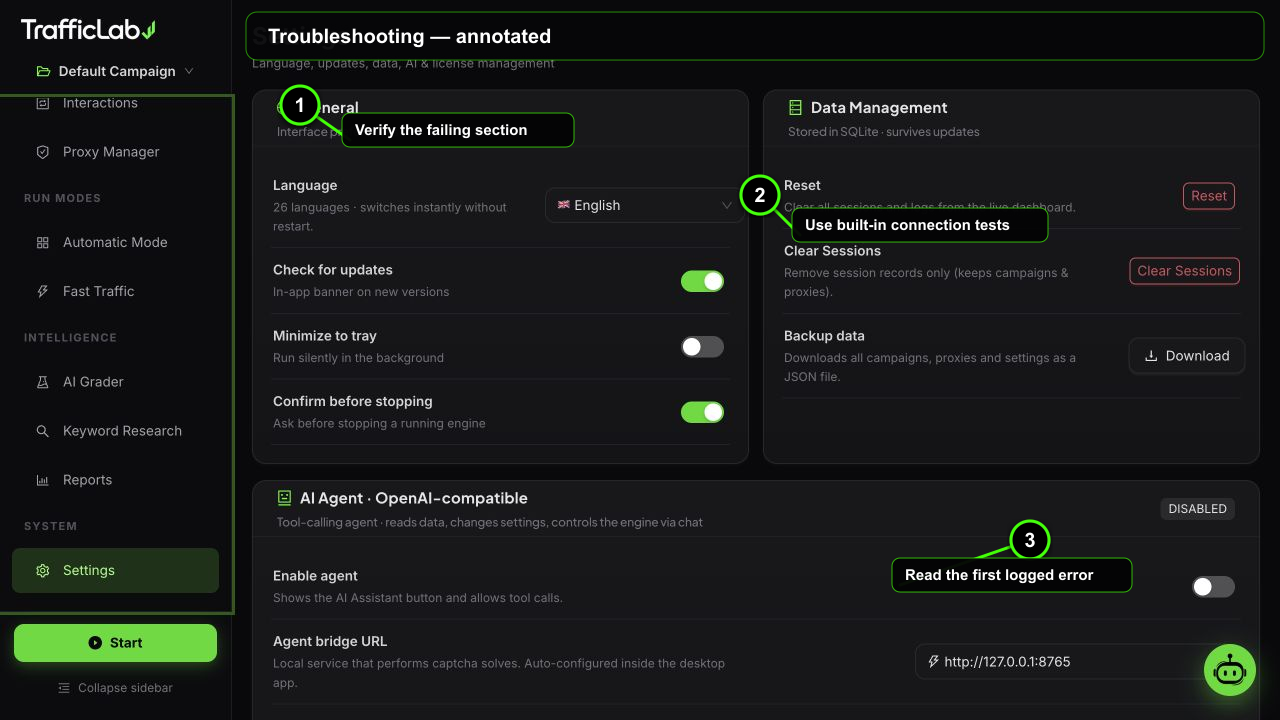
- 1Verify the failing section
- 2Use built-in connection tests
- 3Read the first logged error
Use the symptom first, then verify the dashboard session log and the Settings test buttons. Most issues are caused by a missing browser download, an invalid provider key or a configuration that is too large for the host machine.
Common errors
Installer cannot download ChromiumWindows setup
- Check connectivity: allow the installer through the firewall and retry with a stable connection.
- Check disk space: keep at least 1 GB free before retrying.
- Check antivirus: allow the private Chromium folder if the download is quarantined.
- Retry: the installer verifies the download checksum before extracting it.
Real Browser mode does not startDesktop-only engine
- Use the packaged desktop app: the normal browser preview intentionally falls back to simulation mode.
- Start with one worker: confirm one campaign and one URL work before increasing concurrency.
- Read the first failed event: the session log usually identifies a URL, proxy, timeout or browser error.
Proxy or captcha checks failExternal service setup
- Proxy: validate the endpoint and protocol, then test without a proxy to isolate the problem.
- Captcha: confirm the provider, API key, account balance and site-key fields.
- Timeout: increase the provider timeout only after confirming the endpoint is reachable.
Stats or settings look wrongLocal data and backups
- Reset Data clears counters; Clear sessions removes session records and the log.
- Restore the known-good backup: export a JSON backup before making large changes.
- Refresh the app: close and reopen after changing language, branding or packaged assets.
Before contacting support
Include the app version, operating system, run mode, worker count and the exact first error from the session log. Do not share purchase codes, API keys or private proxy credentials.
Protect credentials
Screenshots and logs should be redacted before sharing. API keys and activation codes are never needed to reproduce a visual or configuration issue.
Fast isolation checklist
Test one URL in Simulation mode, then one worker in Real Browser mode, then enable proxies and optional services one at a time. This identifies the failing layer without changing everything at once.