Annotated interface guide
3 calloutsAutomatic Mode
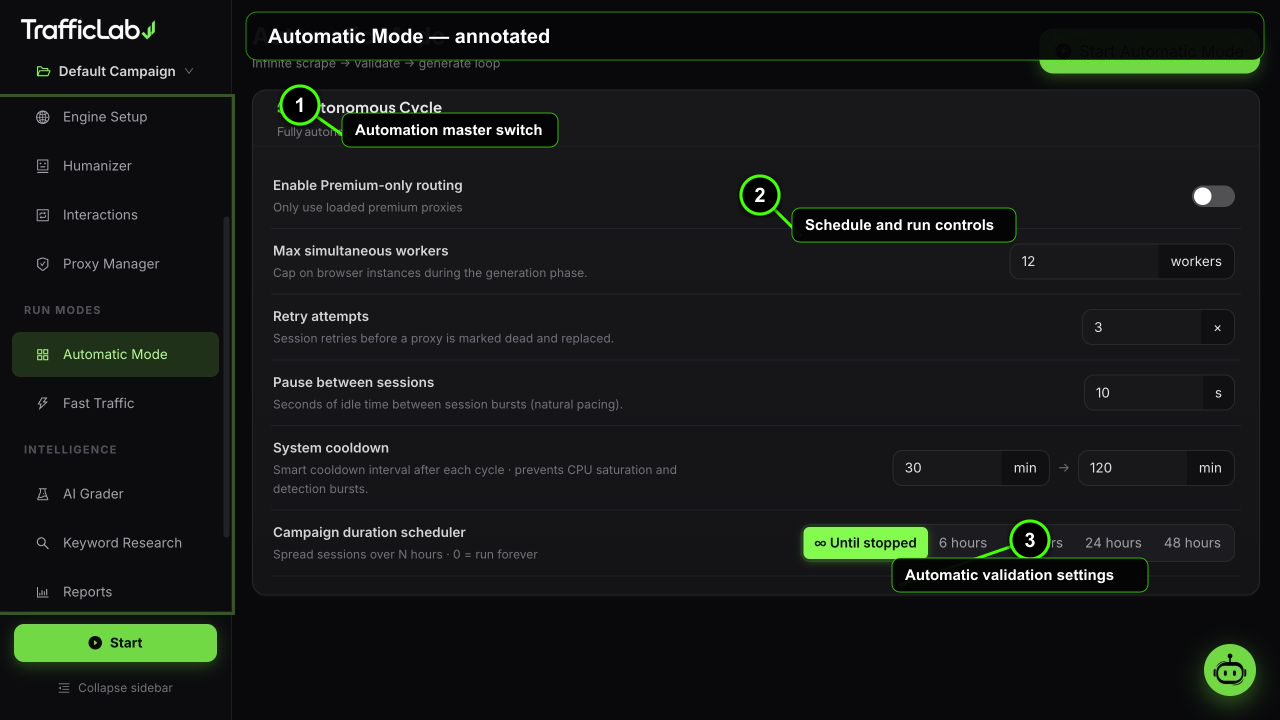
- 1Automation master switch
- 2Schedule and run controls
- 3Automatic validation settings
Automatic Mode is the hands-free engine: it keeps scraping, validating and generating traffic in a loop until you stop it or the schedule ends.
The loop
- Scraping: the engine finds fresh targets (keywords, pages and proxy candidates) for the next cycle.
- Validating: the candidates are checked, proxies are tested, and only usable inputs move on.
- Generating: sessions are produced with the current campaign configuration and the cycle repeats.
While it runs, a status alert shows the current phase with a spinning icon, the elapsed time, the cycle counter, and live completed and active session counts.
Preview vs desktop
On the desktop app the loop works against real data sources. In the browser preview the phases are simulated so you can still see the flow and test the UI.
Settings
| Option | Default | Values | Description |
|---|---|---|---|
| Premium proxies only | Off | On, Off | Restrict the loop to proxies marked as premium in the pool. |
| Max workers | 12 | 2 to 60 | Ceiling for parallel sessions during generation. |
| Retry attempts | 3 | 0 to 10 | How many times a failed session is retried before it counts as failed. |
| Pause between | 10s | 0 to 120s | Idle time between generation cycles. |
| Cooldown | 30 to 120 min | Min 0 to 600, Max 0 to 3600 minutes | Random long pause between cycles to keep behavior natural and limits friendly. |
| Scheduler | Until stopped | Until stopped, 6, 12, 24, 48 hours | Auto stop after the chosen duration, or run forever until you press Stop. |
Controls
- Start (top right): begins the loop with the active campaign. The button turns into Stop while running.
- Stop: ends the loop gracefully after the current cycle.
- Settings lock while the loop runs, same as manual mode.
Use it for long-running tests
Automatic Mode shines for soak tests: configure it on Friday evening with a 48 hour schedule and a wide keyword set, then read the reports on Monday.
Difference from manual mode
Manual mode runs one campaign once and stops when the session count is reached. Automatic Mode regenerates inputs and keeps going, which makes it suitable for continuous testing pipelines.
Related
- Fast Traffic: the volume-focused alternative.
- Proxy Manager: the pool the loop validates and uses.