Annotated interface guide
3 calloutsLicense and activation
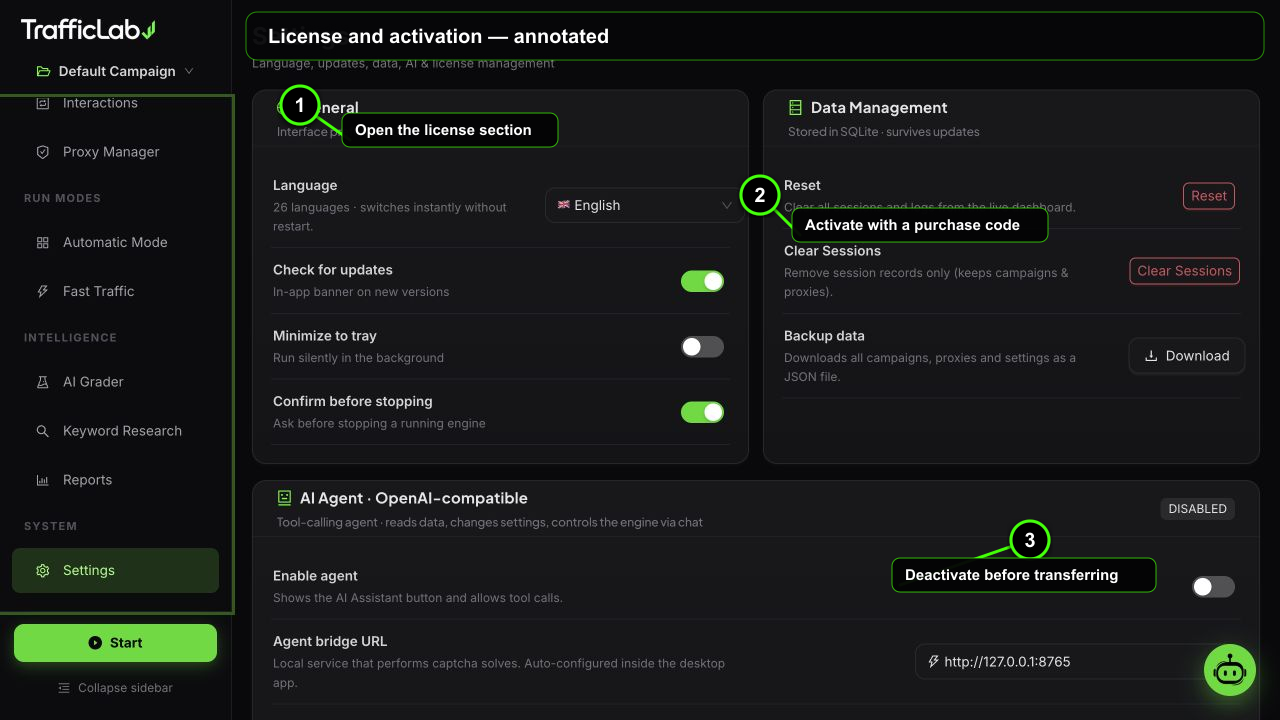
- 1Open the license section
- 2Activate with a purchase code
- 3Deactivate before transferring
TrafficLab uses a simple license key system. Activate once per PC, deactivate when you move to a new machine, and the key always stays retrievable from your purchase history.
Activate
- Open Settings and scroll to the License card.
- Paste your license key into the input (keys are at least 8 characters).
- Press Activate.
- The status switches to active with a green success alert and a masked preview of your key (for example
XXXX•••-••••-••••-••••).
The app shows two states:
License active
Your key is active and tied to this install. All features are unlocked.
Unlicensed
No valid key. Activate with your purchase key to unlock the full engine.
Deactivate and transfer
- Deactivate (next to Activate): frees the key from this PC instantly.
- Transfer: deactivate here, then activate with the same key on your new PC. The key is always retrievable from your purchase history, so a lost key is never a problem.
- One install at a time: the key is meant for a single active install. Deactivating before moving keeps everything clean.
What the license covers
Included with a licenseEverything in the box
- Real Browser Engine (Playwright Chromium sessions).
- Humanizer Engine with all 19 behavior profiles.
- Interaction Engine: internal links, CSS clicks, comments, ad clicks.
- Captcha Service integration (provider costs are separate, pay per solve).
- AI Agent chat assistant (your own API key is required for the model).
- Proxy Manager, Automatic Mode, Fast Traffic, Keyword Research, AI Grader, Reports.
- Free updates for the same major version line.
Separate costs to know about
The license does not include captcha solving credit (billed by the provider, typically dollars per 1,000 solves) or the AI model API usage (billed by your model provider).
Buyer protection note
Keep your purchase email safe: license keys are retrievable from your purchase history at any time, which also makes re-issuing after a lost key straightforward.
Related
- Settings: the License card location and About tags.
- Installation: where to find your copy.