Engine Setup
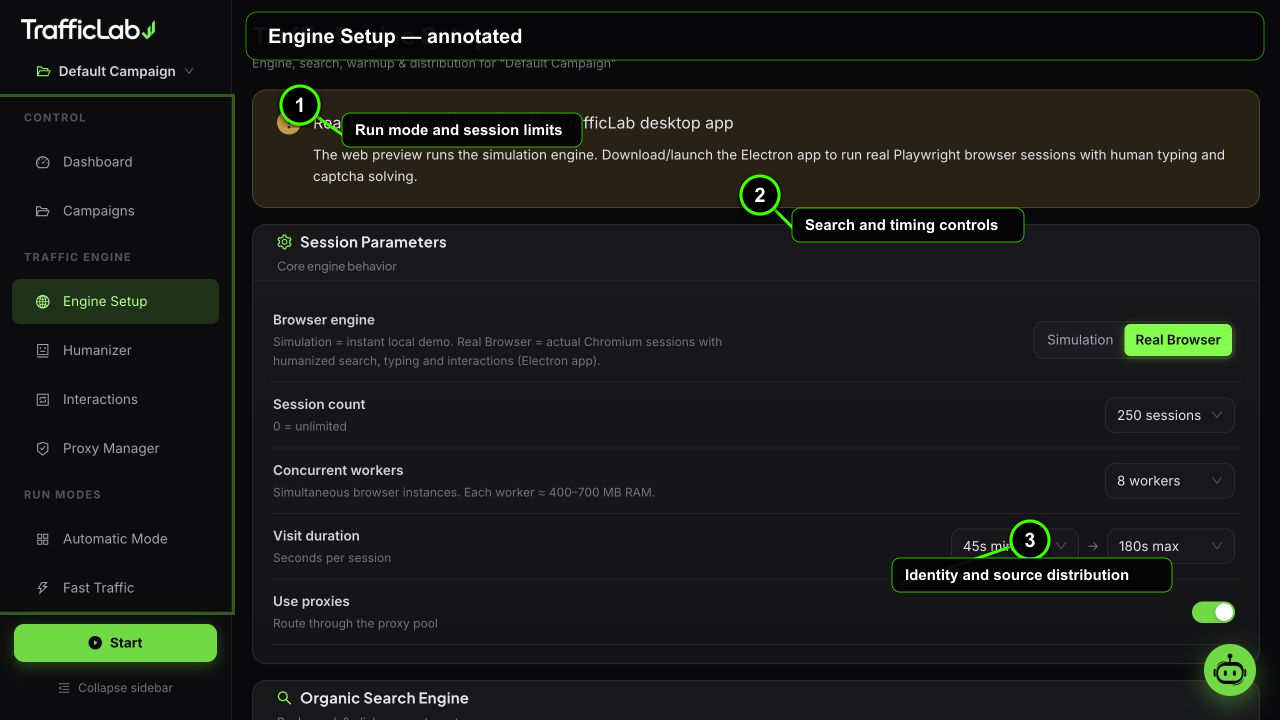
- 1Run mode and session limits
- 2Search and timing controls
- 3Identity and source distribution
Engine Setup configures how sessions are generated for the active campaign: how many, how fast, through which search engines, and with which traffic sources and identities.
Browser engine mode
| Option | Default | Values | Description |
|---|---|---|---|
| Simulation | Off | per campaign | Instant demo sessions without browsers. Good for previews, UI testing and smoke checks. |
| Real Browser | On | per campaign | Actual Playwright Chromium sessions: real searches, typing, scrolling, clicks and browsing. Requires the desktop app. |
Configuration impact map
Use this table to predict what a change will affect before starting a run. Changes are applied to new sessions; an already-running session keeps the values it received when it was queued.
| Option | Default | Values | Description |
|---|---|---|---|
| Workers | 8 | 1–30 | Raises parallel CPU, memory and network use. Increase gradually and watch the session log for timeouts. |
| Session count | Unlimited | Unlimited or fixed limit | Controls run length. A fixed limit makes repeatable test batches; Unlimited continues until Stop. |
| Visit duration | 45–120s | 15–300s | Changes time-on-page and resource cost. Longer ranges create slower, deeper tests and consume more worker time. |
| Traffic distribution | Balanced | Organic / Social / Direct / Custom | Changes referrers and landing paths. The sliders are normalized to 100% before sampling. |
| Identity mix | Balanced | Device / OS / browser weights | Changes viewport, user-agent and platform combinations. Keep related weights coherent for useful analytics tests. |
| Warmup | Off | On / Off | Adds neutral browsing before the target search. It increases session time and can help test first-visit flows. |
Session parameters
| Option | Default | Values | Description |
|---|---|---|---|
| Session count | Unlimited | Unlimited, 50, 100, 250, 500, 1000, 5000 | How many sessions one run delivers. Unlimited runs until you press Stop. |
| Workers | 8 | 1, 2, 4, 6, 8, 10, 15, 20, 25, 30 | Parallel browser sessions. Each worker is one real browser doing the full flow. |
| Visit duration | 45s to 120s | Min 15 to 120s, Max 60 to 300s | Random time each browser stays on the page, picked inside the min to max range per session. |
| Use proxy | Off | On, Off | Routes sessions through the Proxy Manager pool. Off uses your direct IP. |
Organic engine
- Search engine: Google, Bing, Yahoo, DuckDuckGo or Yandex. The browser opens the engine home page and types the keyword.
- Browser identity: auto (a weighted mix) or a fixed Chrome, Firefox, Safari or Edge identity. Every session runs in a fresh private Chromium context with the selected user agent, viewport and platform signals.
- Keywords: tag list, add with the input and Enter. Each session picks a keyword (weighted) and types it per-letter into the search box.
- Warmup: when on, new browsers first visit neutral sites (Wikipedia, YouTube, Reddit, Amazon, BBC) before searching, like a real user warming up a fresh browser.
Traffic distribution
Four sliders split traffic between Organic (via search engines), Social (via referrer links), Direct (typed URL or direct navigation) and Custom. The values are normalized automatically, so you can drag freely.
Social sessions carry a real referrer. Default referrers you can extend:
Identity mix
Three panels of sliders control the identity of every session:
- Device: desktop, mobile, tablet.
- Operating system: Windows, macOS, iOS, Android, Linux.
- Browser: Chrome, Firefox, Safari, Edge.
The engine samples from these weights per session and applies the matching user agent, viewport and platform hints to the real browser. Combined with the Humanizer profiles, this is what makes sessions look like different people on different machines.
Identity presets
- Balanced: 70% desktop, 25% mobile, 5% tablet; Windows 45, macOS 20, iOS 15, Android 15, Linux 5; Chrome 60, Firefox 15, Safari 15, Edge 10.
- Desktop Heavy: 95% desktop, Chrome 80; for analytics tests that target desktop users.
- Mobile Native: 80% mobile, iOS 40 / Android 45, Safari 35; for mobile-first sites.
- Reset all: restores the factory distribution.
How a real session flows
- Queued: the session is created with a sampled identity (device, OS, browser, source, country, city, profile).
- Warming (optional): the browser visits neutral sites first.
- Searching: opens the search engine and types the keyword with human per-letter timing, including bursts, pauses and occasional typos with corrections.
- Browsing: scrolls the SERP, clicks your result, then reads your page with scroll depth, reading pauses and hovers.
- Interacting: applies the Interaction Engine rules: internal links, CSS selector clicks, comments, ad clicks.
- Completed or Failed: recorded with success state, duration and details.
Distribution example
What a balanced identity mix produces per 100 sessions (approximately):
Device:   70 desktop · 25 mobile · 5 tablet
OS:       45 Windows · 20 macOS · 15 iOS · 15 Android · 5 Linux
Browser:  60 Chrome · 15 Firefox · 15 Safari · 10 Edge
Source: 40 organic · 25 social · 25 direct · 10 customRelated
- Humanizer Engine: behavior profiles assigned per session.
- Interaction Engine: what browsers do on the page.
- Proxy Manager: the pool used when Use proxy is on.