TrafficLab overview
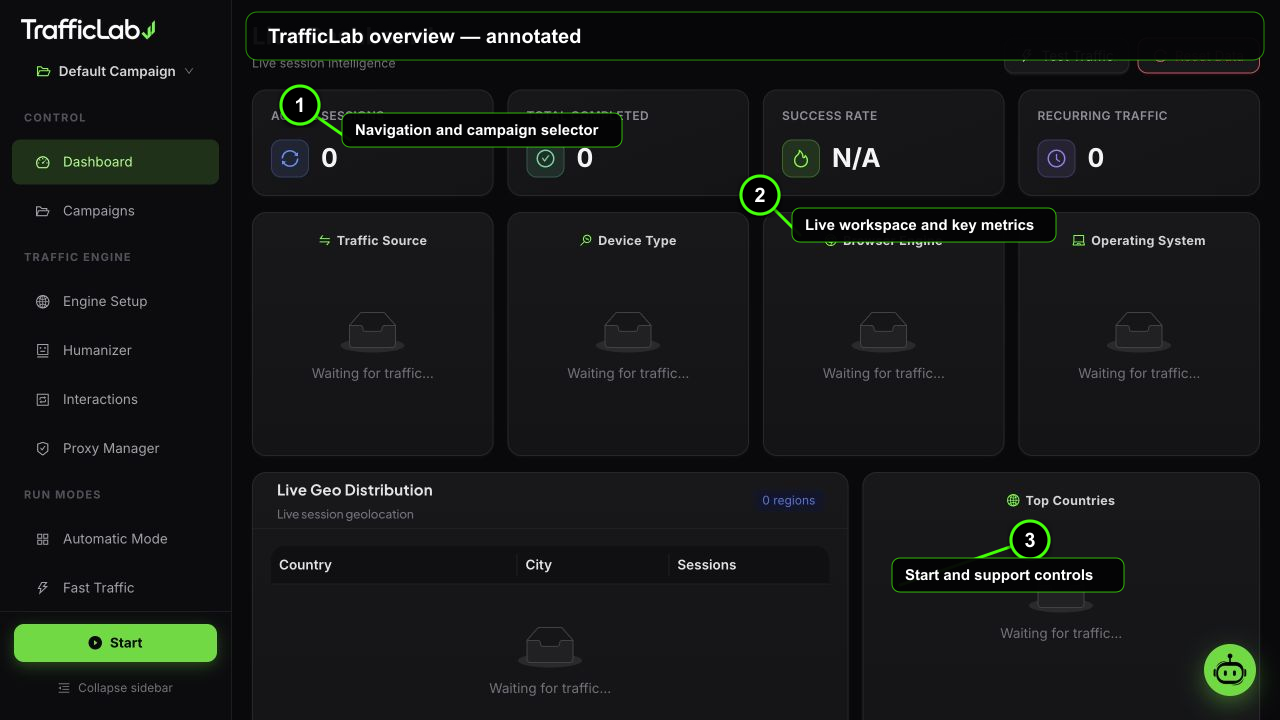
- 1Navigation and campaign selector
- 2Live workspace and key metrics
- 3Start and support controls

TrafficLab Documentation
TrafficLab is a browser automation and analytics testing desktop application for Windows x64. It launches controlled Chromium sessions for websites and analytics properties you own or have explicit permission to test, with an AI Agent, configurable interactions and detailed reports.
What is TrafficLab?
TrafficLab is an Electron desktop application that runs controlled browser sessions for sites you own or have permission to test. Every session uses a Chromium browser: warmup, a real search on Google, Bing, Yahoo, DuckDuckGo or Yandex, per-letter human typing, SERP scrolling, clicking through to your site, humanized browsing, and optional interactions such as comments, internal navigation and user-defined element testing.
A browser preview mode (run with npm run dev) shows the full interface with the simulation engine, so you can explore every screen without launching real browsers. The full real engine ships with the desktop app.
What can it do?
How it works
- Create a campaign. Add your target URLs and keywords. One click also extracts real internal links from your homepage.
- Configure the engine. Pick workers, session count, visit duration, search engine, traffic distribution and identity mix (device, OS, browser).
- Set the humanizer. Choose which behavior profiles can be assigned, or leave all enabled.
- Start the engine. Real browsers open, search engines get typed into with human timing, and sessions flow to your site.
- Watch the dashboard. Every session streams live: stage, source, device, browser, OS, country and city.
- Export the report. CSV, styled HTML or print-ready output with full session details.
Start here
Important
Developer quick reference
The docs site itself is built with Astro SSG, React and Ant Design, and mirrors the app design. If you are building from source:
npm install
npx playwright install chromium   # browser binaries (once)
npm run electron                 # build + launch the desktop app
# or
npm run dev                      # browser-only preview (simulation engine)
npm run bridge                   # standalone bridge for the captcha service